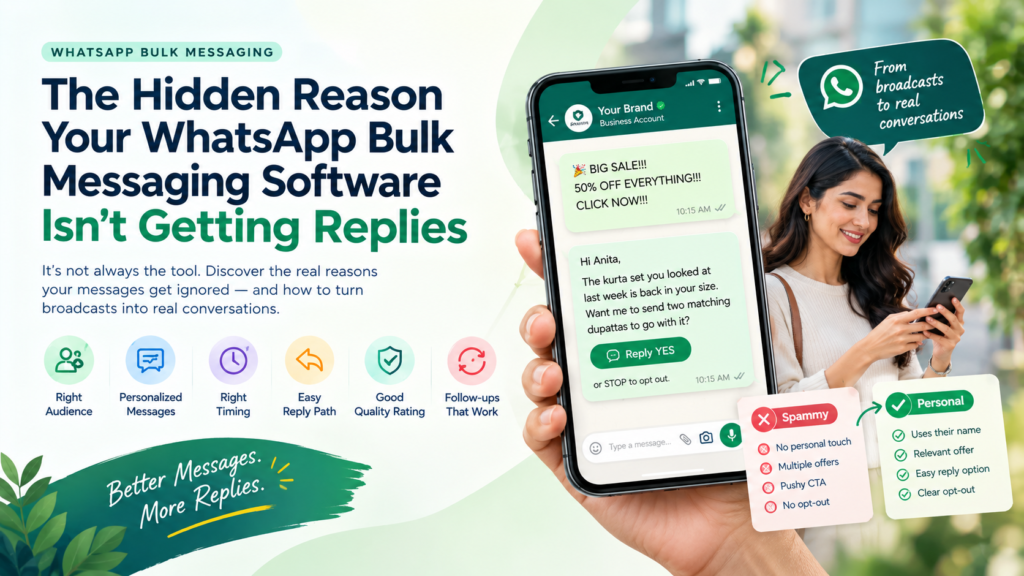
You hit send on thousands of messages, and almost nobody answered.
Your WhatsApp bulk messaging software is rarely the problem. Replies stay low when messages feel generic, reach people who never asked to hear from you, give no easy next step, arrive at the wrong time or get no follow-up. Fix the message and the path after it, and replies follow.
The hidden reason is usually what surrounds the send, not the send itself. This guide opens the case file on six common causes, rewrites a spammy message into a personal one and shows how WhatEdge helps Indian businesses turn broadcasts into conversations.
🔎 Case Summary
- Low replies usually come from the message, the audience and the follow-up, not the sending tool.
- Reply rate depends on four things: permission, relevance, timing and an easy reply path.
- A personal message gives a reason for writing, one clear next step and a simple way to reply.
- Follow-ups and lead tracking recover replies to a single broadcast miss.
- WhatEdge combines campaigns, chatbots, drip follow-ups and a shared inbox on the Official API.
Why Isn’t Your WhatsApp Bulk Messaging Software Getting Replies? The Short Answer
Low replies usually mean your WhatsApp bulk messaging software is working while your campaign is not. The cause is often not delivery. It is a generic message, a cold or unconsented list, poor timing, a hard reply path or missing follow-up. Treat WhatsApp as a conversation channel, not a megaphone.
Replies ≈ Permission × Relevance × Timing × Ease of reply.
If any one factor is near zero, replies collapse, however strong the others are. The six suspects below map to these four factors.
Case File: 6 Reasons Your WhatsApp Bulk Messaging Software Stays Silent
Six suspects explain many silent campaigns on WhatsApp bulk messaging software: a cold list, a generic message, bad timing, a hard reply path, a falling quality rating and no follow-up. Check each one in order. Often, fixing the first two lifts replies more than any new feature.
Suspect 1: A Cold or Unconsented List
Evidence: “Who is this?” replies, blocks and very few reads.
Fix: Message only contacts who opted in, remind them why they hear from you and include a clear way to stop.
Suspect 2: A Generic, Salesy Message
Evidence: The same text for everyone, with no name and no reason for writing.
Fix: Personalise with the name and one relevant detail, lead with value and keep to one offer per message.
Suspect 3: Bad Timing
Evidence: Replies arrive only when your team happens to be online, or messages land late at night.
Fix: Schedule sends for hours when your audience is active and your team or chatbot can answer fast.
Suspect 4: A Hard Reply Path
Evidence: People read the message but do not respond.
Fix: Ask one simple question, add quick-reply buttons and use in-chat forms instead of sending people to a website.
Suspect 5: A Falling Quality Rating
Evidence: Delivery weakens after earlier campaigns drew blocks and complaints.
Fix: Watch your rating, pause weak segments and tighten targeting before the next send.
Suspect 6: No Follow-Up
Evidence: One send, then silence, plus replies your team never answered.
Fix: Add timed follow-ups that stop on reply, and assign every chat to a person.
Want to audit your last campaign? Book a free demo and walk the WhatEdge team through it, to see how WhatEdge’s WhatsApp bulk messaging software handles reply paths, follow-ups and quality tracking.
Message Makeover: From Spammy to Personal (Before and After)
Any WhatsApp marketing tool can send a message; only you can make it sound human. Personal messages name the recipient, give a reason for writing, offer one clear next step and make replying effortless. Compare the before and after below, then rewrite your next template the same way.
|
Element |
Spammy |
Personal |
|
Greeting |
“Dear customer” | “Hi Anita” |
| Reason for writing | None |
“You looked at this last week” |
|
Offer |
Five offers in one message |
One clear offer |
|
Call to action |
“Click the link now” |
A quick-reply button or “Reply YES” |
|
Tone |
CAPITALS and many exclamation marks |
Warm, short, plain language |
|
Opt-out |
Hidden or missing |
“Reply STOP to opt out” |
Before: BIG SALE!!! 50% OFF EVERYTHING!!! CLICK NOW!!!
After: Hi Anita, the kurta set you looked at last week is back in your size. Want me to send two matching dupattas to go with it? Reply YES, or STOP to opt out.
WhatEdge fills names and other details into approved templates from the contact record using merge fields, so personal messages work at scale.
What Happens After the Send? Where Follow-Up Wins Replies
Many replies are won after the broadcast, not during it. Customers need an instant answer, a nudge a day later and a person who remembers the conversation. Without that structure, interested contacts drift away. Follow-up is where bulk messaging becomes a sales process.
WhatsApp Automation Software That Follows Up on Time
WhatsApp automation software handles the timing you cannot manage by hand. It sends a drip message after a day or a week, personalises each step and stops the moment someone replies, so nobody is chased after answering.
WhatsApp Lead Management That Turns Replies into Pipeline
Good WhatsApp lead management gives every reply to an owner. Assign chats to agents, add internal notes and tags, and keep full history on each contact, so the next message builds on the last one.
Mini Example: A Property Launch (Hypothetical Scenario)
A developer sends a launch broadcast to 1,500 opted-in contacts, and 120 replies.
| Moment | Without Structure |
With Follow-Up Structure |
| Replies received | 120 |
120 |
|
Answered within minutes |
About 40 |
All 120, with a chatbot covering the first answer |
|
Hot leads |
Remembered by one agent | Assigned to agents with notes in the inbox |
| Silent readers | Forgotten |
One timed follow-up that stops on reply |
💡 Pro Tip: Answer within minutes, while interest is high. A chatbot can give the first reply and hand it over to a person when the chat turns serious.
Your 14-Day Reply Recovery Plan
You can start lifting replies in two weeks by fixing one factor at a time: audit your list, rewrite your template, set a reply path, schedule smartly and add follow-ups. Change one thing per campaign so you can see what worked. Small, measured tests beat a complete overhaul.
- Days 1-3, Audit: Remove contacts without clear consent, clean duplicates and tag by interest.
- Days 4-6, Rewrite: Personalise, keep one offer and one call to action, and add an opt-out line.
- Days 7-9, Build the reply path: Add quick-reply buttons, a chatbot for common questions and handover to an agent.
- Days 10-12, Test and schedule: Try two wordings or two send times on small segments.
- Days 13-14, Follow up and review: Set a drip that stops on reply, then compare reply counts per campaign.
✔ Reply-Ready Checklist
- Every contact opted in
- Template names the recipient and gives a reason for writing
- One offer and one clear call to action
- A quick-reply button or a simple one-word reply
- A chatbot or agent ready to answer within minutes
- Follow-up sequence set to stop on reply
- Replies tracked per campaign
⚠️ Common Mistake: Judging a campaign on delivery alone. Delivered is not read, and read is not replied. Track replies for every campaign.
Want help setting up the reply path? Tell the WhatEdge team your use case and ask for a 20-minute walkthrough.
How to Choose WhatsApp Bulk Messaging Software That Gets Replies
Choose WhatsApp bulk messaging software for what happens after the send, not only for how many messages it can fire. The best options pair campaigns with a chatbot, follow-up automation, a shared inbox and clear reply reporting, all on the Official WhatsApp Business API.
Any WhatsApp marketing tool you shortlist should also pass these tests:
- Personalises from contact fields using approved templates
- Offers keyword, button and menu chatbot flows with human handover
- Runs drip sequences that stop on reply
- Assigns chats and keeps history in a shared inbox
- Shows delivered, read and replied for every campaign
- Watches your quality rating and warns you early
Why WhatEdge Is Built for Replies, Not Just Sends
WhatEdge is WhatsApp bulk messaging software designed around the conversation that follows the send. Campaigns, chatbots, drip follow-ups, a shared team inbox, catalogue ordering and integrations sit in one dashboard on the Official WhatsApp Business API, so every reply has somewhere to go.
- Personalised campaigns: merge fields from the contact record, CSV upload, Excel paste or saved segments, with live delivery, read and reply counts
- Chatbots and smart flows: keyword, button and menu journeys that answer common questions, capture details and hand over to a live agent
- Drip campaigns: custom intervals, A/B testing of wording and timing, and exit conditions that stop when someone replies
- Shared team inbox: assignment, internal notes, role-based access and full conversation history
- Interactive forms and catalogue: customers fill in forms and place orders without leaving the chat
- Quality rating watch and opt-out handling to protect your number
- Integrations: invoices from Tally and Busy, reminders from Google Sheets, and API and webhooks with two-way CRM sync
There is no setup fee, and no plan caps how much you send, since your reach follows your Meta messaging tier. Onboarding is done with you. No software can guarantee replies, because message quality and list quality still decide the result. See it at WhatEdge
Conclusion
Low replies rarely mean your WhatsApp bulk messaging software is broken. They usually mean the list is cold, the message is generic, the reply path is hard or nobody follows up. The hidden reason was never the send button. Fix permission, relevance, timing and ease of reply, then add automation and a shared inbox so every response gets answered. Small changes, tested one at a time, add up quickly. Ready to turn broadcasts into conversations? Visit whatedge.in and book a free demo with WhatEdge.
FAQs
What makes a WhatsApp marketing tool feel personal instead of spammy?
A WhatsApp marketing tool feels personal when messages go only to opted-in contacts, use the recipient’s name, give a clear reason for writing, offer one next step and make replying easy. WhatEdge supports merge fields from the contact record in approved templates, button-driven chat flows and automatic opt-out handling.
Can WhatsApp automation software help avoid getting numbers banned?
WhatsApp automation software can lower ban risk when it enforces good habits, such as excluding opted-out contacts, spacing follow-ups and stopping sequences on reply, but it cannot guarantee safety. WhatEdge runs only on the Official WhatsApp Business API, honours opt-outs automatically and warns you before a campaign puts your quality rating at risk.
How does WhatsApp lead management improve follow-up after a bulk campaign?
WhatsApp lead management improves follow-up by giving every reply an owner and a history. Agents see who answered, what they asked and what was promised, so no lead slips through. WhatEdge offers a shared team inbox with assignment, internal notes and full conversation history, plus drip sequences that stop when a contact replies.