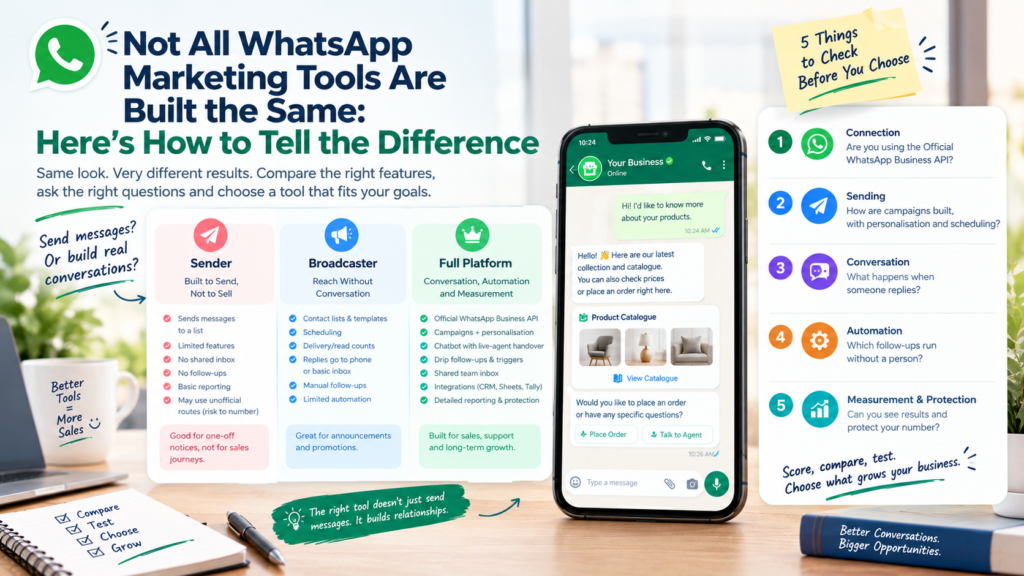
Two WhatsApp tools can look identical on a pricing page and behave completely differently on campaign day.
To compare a WhatsApp marketing tool, score it on five things: how it connects to WhatsApp, how it sends, how it handles replies, how it automates follow-ups and how it measures and protects your number. Then test every shortlisted tool with the same demo tasks on your own data.
This guide gives you a 100-point rubric, a plain-language map of the three kinds of tool, a decoder for common sales-page claims and a 30-minute demo script. It also shows where WhatEdge fits for Indian businesses.
Five things to remember
- Connection comes first: the Official WhatsApp Business API, or not.
- Sending is one job. Conversations, follow-ups and reporting are the rest.
- Automation belongs inside the tool you use daily, not in a patchwork.
- Sales-page claims need translating into questions.
- Test with your own data, with the same tasks for every vendor.
How to Compare a WhatsApp Marketing Tool: The Five-Dimension Rubric
Compare every WhatsApp marketing tool on five dimensions worth 20 points each: connection, sending, conversation, automation and measurement with protection. Score each tool out of 100 using the same questions. The totals matter less than the gaps, because a tool that scores zero on conversation will leave replies unanswered.
| Dimension (20 points each) | What to Ask | What Full Marks Look Like |
| Connection | Does it run on the Official WhatsApp Business API, or automate the regular app? | Official API only, with business verification handled for you |
| Sending | How are campaigns built and personalised? | Approved templates, merge fields, CSV or saved segments, scheduling |
| Conversation | What happens when someone replies? | Chatbot with live-agent handover and a shared team inbox |
| Automation | Which follow-ups run without a person? | Drip sequences that stop on reply, plus triggers from your own data |
| Measurement and protection | Can I see results and risks early? | Delivered, read and replied per campaign, opt-out handling, quality rating alerts |
As a rule of thumb, a score of 80 or more points to a full platform, and a score below 40 usually means a sender with a few extras.
Sender, Broadcaster or Full Platform: Three Kinds of WhatsApp Marketing Tool
Every WhatsApp marketing tool falls into one of three kinds: a sender that pushes messages out, a broadcaster that adds lists and scheduling, or a full platform that also handles replies, automation, leads and reporting. Knowing the kind tells you what the tool can and cannot do before you see a demo.
WhatsApp Sender Software: Built to Send, Not to Sell
WhatsApp sender software does one job: it pushes a message to a list of numbers. It rarely offers a shared inbox, chatbot, follow-ups or reporting. Some senders also work by automating the regular app, which puts your number at risk. It can serve a one-off notice, but it is weak for sales.
Bulk WhatsApp Software: Reach Without Conversation
Bulk WhatsApp software adds contact lists, templates, scheduling and delivery counts. It reaches many people well, but replies land in a phone or a basic inbox, and follow-up stays manual. It suits announcements more than sales journeys.
The Full Platform: Conversation, Automation and Measurement
A full platform treats the send as step one. Chatbots catch replies, drip sequences follow up, a shared inbox gives every chat an owner, integrations move data and reports show what worked, all on the Official API.
Not sure which kind you use today? Book a free WhatEdge demo and see how a full WhatsApp marketing tool handles replies, follow-ups and reporting on your own use case.
Decode the Sales Page: What Common Claims Really Mean
Many WhatsApp marketing tool sales pages use friendly phrases that hide important details. Translate each claim into a question before you trust it. The decoder below covers the claims you will meet most often and the follow-up question that exposes what sits behind them.
| The Claim | What It May Really Mean | Ask This |
| “Unlimited messages” | Few plan caps, but your real limit follows Meta’s messaging tier and your quality rating | What limits apply beyond the plan, and how do you protect my rating? |
| “No template approval needed” | Messages may travel through an unofficial route | Is every message sent through the Official WhatsApp Business API? |
| “Use your own number in minutes” | It may connect the regular app by scanning a code | How is my number registered and verified with Meta? |
| “AI chatbot included” | It may be a keyword auto-reply with no handover | Can I see handover to a live agent, with details saved on the contact? |
| “Free plan” | Costs may sit in messaging charges or paid add-ons | What is my total cost for 10,000 messages and three agents? |
Field note: A claim is not a lie just because it needs a follow-up question. Good vendors answer these questions plainly and show the answer live.
Built-In or Bolted-On: Where WhatsApp Automation Software Should Live
Automation should live inside the tool where you send, reply and track leads. When WhatsApp automation software is bolted on from a separate service, data splits across systems, follow-ups misfire and nobody owns the fix. Use separate tools only when a specific workflow genuinely needs them.
Built-in automation tends to give you:
- One contact record that every automation reads and writes
- Follow-ups that stop automatically when someone replies
- One place to see what ran and what failed
- One vendor to call when something breaks
Bolted-on automation often brings:
- Duplicate or out-of-date contact data
- Messages that go out after a customer has already replied
- Extra subscriptions and extra logins
- Finger-pointing between vendors
On WhatEdge, automation sits in the same dashboard as campaigns and the inbox: drip campaigns with custom intervals, A/B testing and exit conditions, plus triggers from Tally, Busy, Google Sheets and your CRM through its API and webhooks.
Run a 30-Minute Demo Test on Any WhatsApp Marketing Tool
Give every vendor the same five tasks and the same thirty minutes, using your own contact list, template and use case. Watch what the tool does live, not what slides promise. The comparison becomes fair, and the gaps in weaker tools show up quickly.
- Task 1, Send (5 minutes): Build a personalized campaign from your own list and schedule it.
- Task 2, Reply (8 minutes): Reply to the campaign as a customer and watch the chatbot and the handover.
- Task 3, Follow up (7 minutes): Set a drip sequence that stops when you reply.
- Task 4, Assign and track (5 minutes): Assign the chat to an agent, add a note and find it again later.
- Task 5, Measure and protect (5 minutes): Open the report, check opt-out handling and find the quality rating.
Hypothetical scoring example
|
Dimension |
Tool A (Sender) |
Tool B (Broadcaster) |
Tool C (Full Platform) |
|
Connection |
4 | 12 |
20 |
|
Sending |
12 | 16 |
18 |
|
Conversation |
0 | 4 | 18 |
| Automation | 0 | 6 |
16 |
|
Measurement and protection |
2 | 10 | 17 |
| Total (out of 100) | 18 | 48 |
89 |
Tool A sends well but fails on conversation and automation. Tool B is a solid broadcaster. Tool C wins on the three dimensions that start after the send. These scores are illustrative, not real vendors.
Which Kind of WhatsApp Tool Fits Your Business?
Choose by what happens after the send. If you send occasional notices to a small list, a basic option can do. If replies, leads and follow-ups drive revenue, you need a full platform. Match the tool to your next twelve months, not your current month.
| Your Situation | Best Fit |
| Occasional notices to a small, opted-in list | A basic broadcaster on the Official API |
| Regular campaigns, replies handled by one or two people | A broadcaster with a shared inbox |
| Replies, leads and follow-ups drive revenue | A full platform with chatbot, automation and lead tracking |
| WhatsApp tied to orders, invoices and your CRM | A full platform with integrations |
Watch out: Buying a sender for its price and finding out later that it cannot answer replies. The cheapest tool is the one you do not have to replace in six months.
Where WhatEdge Fits: A Full Platform on the Official API
WhatEdge is a WhatsApp marketing tool built as a full platform on the Official WhatsApp Business API. Its team handles registration, business verification and template approvals, and you get campaigns, chatbots, drip follow-ups, a shared inbox, catalogue ordering and integrations in one dashboard.
Here is how it maps to the rubric:
- Connection: Official API only, with registration and verification handled by the team
- Sending: CSV upload, Excel paste or saved segments, merge fields, scheduling, and live delivery, read and reply counts
- Conversation: chatbots with keyword, button and menu flows, live-agent handover, and a shared inbox with assignment, internal notes and full history
- Automation: drip campaigns with A/B testing and exit conditions, plus triggers from Tally, Busy, Google Sheets and your CRM
- Measurement and protection: campaign reports, template health, opt-out handling and quality rating watch
There is no setup fee, no plan caps how much you send (your reach follows your Meta messaging tier), and you buy messaging from one vendor on one invoice. Most businesses go live inside a week, with Meta’s verification taking most of that time. No tool removes every risk, and a good platform still depends on a clean, opted-in list. Bring your rubric to a free 20-minute demo at WhatEdge and score yourself.
Conclusion
Choosing a WhatsApp marketing tool gets easier when you stop comparing feature lists and start scoring outcomes. Check the connection, sending, conversation, automation and measurement, decode the sales-page claims and run the same 30-minute test for every vendor. The right tool handles what happens after the send, not just the send itself. Scores and demos beat promises every time, and the few hours you spend comparing now can save months of switching later. Ready to score a full platform yourself? Visit WhatEdge and book a free demo.
FAQs
What’s the real difference between WhatsApp sender software and a full marketing tool?
WhatsApp sender software pushes messages to a list of numbers, while a full marketing tool also handles replies, follow-ups, lead tracking and reporting. The difference shows after the send. WhatEdge is a full platform on the Official WhatsApp Business API, with chatbots, drip sequences, a shared inbox and campaign reports, so conversations continue after every campaign.
Should automation be built into WhatsApp automation software or added separately?
Automation is best built into your WhatsApp automation software, because one contact record, one inbox and one set of rules keep follow-ups accurate and stop them when a customer replies. Separate tools suit rare, specialised workflows. WhatEdge builds drip campaigns, chatbots and triggers from Tally, Busy, Google Sheets and your CRM into one dashboard.
Is bulk WhatsApp software enough or do I need more features?
Bulk WhatsApp software is enough only for simple announcements to a small opted-in list. If you need replies handled, leads tracked and follow-ups sent on time, you need more: a chatbot, automation, a shared inbox and reporting. WhatEdge combines bulk campaigns with all of these on the Official WhatsApp Business API.